Forgot Your Qiwa Password? Here's How to Reset Your Qiwa Password
Can't log in to your Qiwa account because you forgot your password? Learn the official step-by-step process to reset your Qiwa password, recover your account, and fix common login problems for workers in Saudi Arabia.
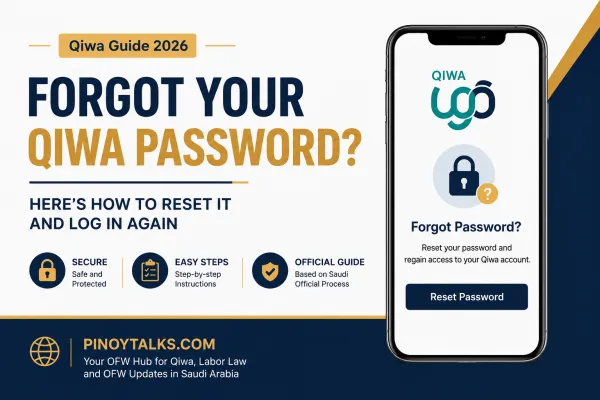
Forgot qiwa password reset guide
Introduction
If you can't access your Qiwa account because you forgot your password, don't panic. This is one of the most common issues experienced by OFWs and expatriate workers in Saudi Arabia.
The good news is that Qiwa does not use its own password.
Your Qiwa account is linked to your National Access (Nafath) and Absher account, which means your login credentials are managed through Saudi Arabia's national digital identity system.
In this guide, you'll learn:
- Why you can't log in to Qiwa
- How to reset your password
- What to do if you also forgot your Nafath password
- How to regain access to your account
- Common login problems and solutions
This tutorial is based on the official authentication process used by Qiwa and Saudi government digital services.
Kabayan Question of the Day
"Sir, Hindi ko na ma-open ang Qiwa ko, nakalimutan ko na ang Password, Ano po ang gagawin ko para maka-log in ulit? Salamat."
If you don't have a Qiwa account yet, follow our Qiwa sign-up and log in guide before continuing.
Why You Can't Log In to Qiwa
Many workers think they have forgotten their Qiwa password.
In reality:
Qiwa does not create a separate password for workers.
When you click Sign In, Qiwa redirects you to Saudi Arabia's National Single Sign-On (SSO), which uses your Absher/Nafath credentials.
That means:
- Your username is your Iqama number (or National ID)
- Your password is your Absher password
- Authentication is completed through Nafath or SMS verification
So if you've forgotten your password, you need to recover your Absher account, not Qiwa itself.
Step 1: Go to the Official Qiwa Website
Open your browser and visit:
https://www.qiwa.sa
Click:
Sign In
You'll automatically be redirected to the National Access login page.
Step 2: Click "Forgot Password"
On the National Access login page:
Select Forgot Password
Enter your:
Iqama Number
Date of Birth
Complete the verification process.
Follow the instructions to create a new password.
If your registered mobile number is active, you'll receive a verification code.
New to Qiwa? Read our complete Qiwa registration and login tutorial to get started.
Step 3: Create a Strong New Password
When creating a new password:
Use:
- Uppercase letters
- Lowercase letters
- Numbers
- Special characters
Example:
Saudi@2026Work
Avoid using:
- Your birthday
- Iqama number
- 123456
- Password123
Step 4: Log Back Into Qiwa
Once your password has been successfully changed:
Return to:
https://www.qiwa.sa
Log in again using:
- Iqama Number
- Your new Absher password
Complete the verification.
You should now have access to your Qiwa account.
What If I Forgot My Nafath Password Too?
This is another common issue.
Since Nafath uses the same account as Absher, resetting your Absher password also restores access to:
- Qiwa
- Nafath
- Absher
- Many Saudi government services
You only need to reset your password once.
What If My Registered Mobile Number Is No Longer Active?
This is one of the biggest reasons workers cannot recover their account.
If your old Saudi mobile number has been cancelled:
You may need to:
- Update your mobile number through Absher
- Visit a self-service kiosk
- Visit Jawazat if necessary
Without access to your registered mobile number, password recovery may not be possible online.
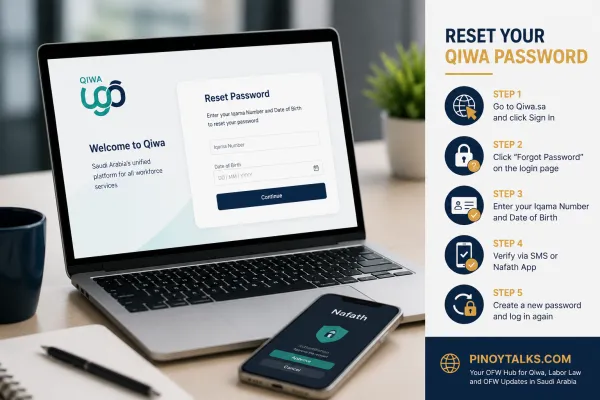
Qiwa login password
What If My Qiwa Account Is Locked?
Too many incorrect login attempts can temporarily lock your account.
If this happens:
- Wait several minutes before trying again.
- Use the password recovery option.
- Avoid repeatedly entering the wrong password.
Common Qiwa Login Problems and Solutions
| Problem | Solution |
|---|
| Forgot password | Reset through National Access (Absher) |
| Forgot username | Use your Iqama Number |
| OTP not received | Check mobile signal, wait a few minutes, or verify your registered number |
| Nafath not working | Update the Nafath app and try again |
| Mobile number changed | Update it through Absher before resetting your password |
| Browser error | Clear your browser cache or use another browser |
| Account locked | Wait, then reset your password |
Tips to Avoid Future Login Problems
To prevent getting locked out again:
- Save your password in a secure password manager.
- Keep your registered Saudi mobile number active.
- Update your Absher information whenever your phone number changes.
- Never share your login credentials with anyone.
- Enable biometric login in the Nafath app if available.
Frequently Asked Questions (FAQ)
Can I change my Qiwa password directly?
No.
Qiwa uses Saudi Arabia's National Access system. You change your Absher/Nafath password instead.
Is my Qiwa password the same as Absher?
Yes.
Qiwa authenticates users through National Access, which uses your Absher credentials.
Can I log in without Nafath?
Depending on the authentication method required for your account, you may be asked to verify through SMS or the Nafath app. Some transactions specifically require Nafath approval.
What if my employer created my Qiwa account?
Your employer may have initiated your employment profile, but your personal login is still tied to your National Access (Absher/Nafath) credentials.
Can I create a new Qiwa account if I forgot my password?
No.
You should recover your existing National Access account rather than create a new Qiwa account.
Final Thoughts
Forgetting your Qiwa password doesn't mean you've lost access to your employment records. In most cases, the issue is with your Absher/Nafath login credentials, not Qiwa itself.
By resetting your password through Saudi Arabia's National Access system, you can regain access to your Qiwa account and continue managing your employment information, contracts, and services.
If the online recovery process doesn't work because your mobile number has changed or your account is locked, resolve the issue with your Absher account first. Once that's fixed, your Qiwa login should work normally again.
Related Articles
Want to know more about Qiwa, transfer, end of service benefits, notice period, resignation and Saudi labor law? visit Pinoytalks.com for more updates!
Disclaimer: This article is for general informational purposes and is based on the official authentication flow used by Qiwa and Saudi Arabia's National Access system. Features and procedures may change over time. Always verify the latest instructions through the official Qiwa, Absher, and Nafath platforms before taking action.